Git styled calendar with custom dates
git styled calendar created from list of dates saved as csv file

Daniel Gustaw
• 2 min read
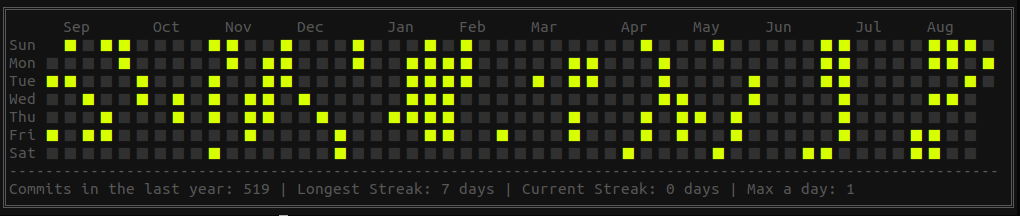
Let us assume that you have a set of dates. You want to display these dates in a readable clear way.
For example like this:

So I have great info. It is one line of code, maybe two…
In this article I will show how to generate an image like these.
What do you need?
- jq - great toll for json / text processing
- node - js interpreter
- awk - text processor for selecting data
Installation
npm i -g cli-gh-calPreparing file with dates
We want to prepare a file with dates like these
2019-08-13
2018-05-19
2018-06-22
2019-04-16
Allow us to assume that you need to show dates of creation of files in your folder with photos. You can do it using the command
ls -l --time-style=long-iso . | awk '{print $6}' | sort > /tmp/dates.csvOption --time-style allows showing dates in easy to the processing format. Next awk selects column with dates and sorted dates are saved in temporary file /tmp/dates.csv .
Displaying git styled calendar
Now if you want to display these dates, you need to type
cli-gh-cal --data "$(jq -R '[inputs | [.,1] ]' < /tmp/dates.csv)"In this case, we put to work jq - powerful templater for json files. It allows replacing the list of dates to json string required by cli-gh-cal. After executing this command you should see an image similar to presented at the beginning.
Required packages
To work there, have to be installed node. I recommend installing it with nvm on the local machine.
https://www.digitalocean.com/community/tutorials/how-to-install-node-js-on-ubuntu-18-04
Next package - cli-gh-cal can be installed by npm - node packages manager
Finally, you need also jq
I hope you like this article. For me, it is a great example of how a small amount of code is needed to achieve great-looking results in data visualization today. Wow!
Screenshot from my console

Other articles
You can find interesting also.
Scraping from money.pl in 30 lines of code.
See a simple case study of downloading and processing data from a paginated table.
Daniel Gustaw
• 8 min read

How many families can fit on the plane - an algorithmics problem
We compare two solutions to the problem of counting free sets of adjacent seats. You will learn how to use Profiling and how much difference the use of pop and shift makes on arrays in js.
Daniel Gustaw
• 12 min read

How to create a free email account with custom domain?
In this article, you will learn how to create a free email with a custom domain. I've shown how to configure Yandex with your DNS.
Daniel Gustaw
• 1 min read